I recently released MMM-PageBtn, a MagicMirror module that uses a physical GPIO button to control page rotation. If you use MMM-Pages to organize your modules across multiple screens, this adds a simple hardware interface—press a button to flip through pages without touching the display.
Why a Physical Button?
I wanted to control which page was displayed on my MagicMirror without needing a touchscreen. A single button mounted in the mirror frame keeps things simple: short press to advance, long press to pause rotation.
Button Behavior
The module distinguishes between short and long presses:
- Short press (< 1 second): Advance to the next page. If rotation was paused, it resumes.
- Long press (≥ 1 second): Pause automatic rotation.
- Auto-resume: After 5 minutes of being paused, rotation automatically resumes.
Long press fires when the threshold is reached—you don’t need to release first. Repeated long presses reset the auto-resume timer.
Pi 5 and Bookworm Compatible
One of the motivations for building this module was compatibility. Raspberry Pi OS Bookworm deprecated the old sysfs GPIO interface, which broke many existing GPIO libraries. MMM-PageBtn uses libgpiod and spawns the gpiomon CLI tool instead of relying on native Node GPIO libraries. This means no node-gyp compilation, no native dependencies, and it works on Pi 5 out of the box.
Hardware Setup
The wiring is minimal—just a momentary pushbutton connected between GPIO17 and ground:
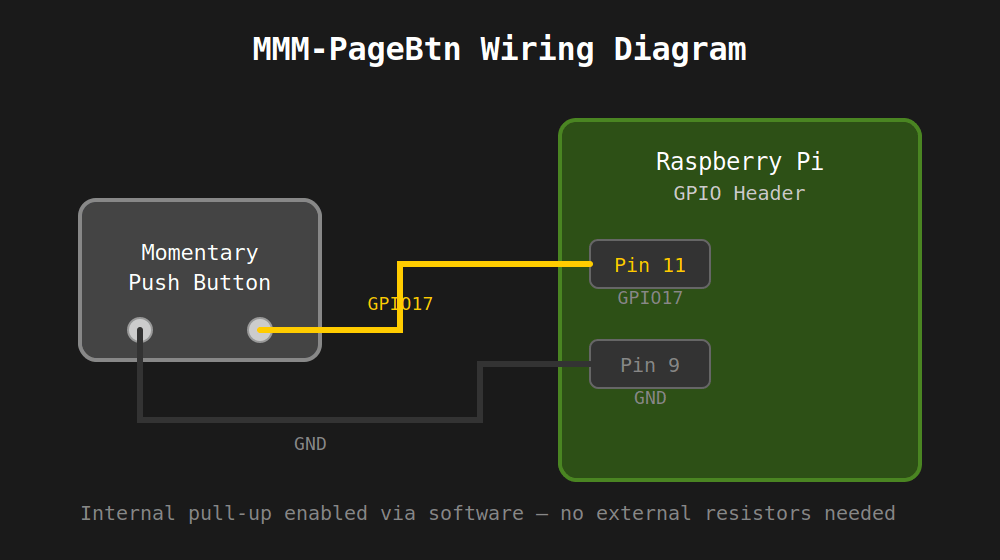
The internal pull-up resistor is enabled via software, so no external resistors or capacitors are needed. The button I used is a 12mm stainless steel momentary switch with pre-wired leads, which makes installation clean.
Components
- Momentary push button switch (12mm, normally open): https://www.amazon.com/dp/B09BKWMNJ9
- Female-to-female jumper wires (20cm): https://www.amazon.com/dp/B0BRTJQGS6
Installation
cd ~/MagicMirror/modulesgit clone https://github.com/sonnyb9/MMM-PageBtn.gitsudo apt install -y gpiodNo npm install required—the module has no Node dependencies.
Configuration
Add to your config/config.js:
{ module: "MMM-PageBtn", position: "top_left", config: { gpioLine: 17, longPressMs: 1000, resumeAfterMs: 300000, logging: "on" }}The logging option controls verbosity: "off" for errors only, "on" for operational events (short press, long press, auto-resume), or "debug" for troubleshooting.
Technical Notes
The module spawns gpiomon with --bias=pull-up to enable the internal pull-up resistor. Button presses pull GPIO17 to ground, generating falling and rising edge events. The node helper tracks press duration and classifies each release as short or long press, then sends the appropriate notification to MMM-Pages.
If gpiomon exits unexpectedly, the module automatically restarts it after a short delay.
Credits
Designed for use with MMM-Pages by edward-shen.
Resources
GitHub: https://github.com/sonnyb9/MMM-PageBtn
If you’re running MMM-Pages and want simple physical control, give MMM-PageBtn a try.
 bertoncini.net
Leave a comment