I have been running a MagicMirror in my home for a while now. One thing that always bothered me was the lack of a well-maintained module for displaying SmartThings device status. The existing options were either abandoned. Some required workarounds that broke every few months. Others stored API credentials in plain text config files.
So I built MMM-STStatus.
What It Does
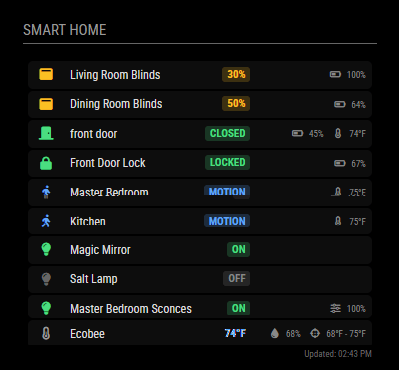
MMM-STStatus displays the status of your SmartThings devices in a clean table format. Locks, door sensors, motion sensors, thermostats, blinds, presence sensors — it pulls everything into one glanceable view. You see what’s locked, what’s open, who’s home, and what temperature your thermostat is set to. The display updates automatically and shows color-coded status indicators so you can spot issues at a glance.
[IMAGE: screenshots/example.png]
Why I Built It
The SmartThings ecosystem has a problem: the official cloud API uses OAuth tokens that expire every 24 hours. Most existing MagicMirror modules used Personal Access Tokens. This usage meant you’d wake up to a broken display every morning. You had to manually refresh your credentials.
MMM-STStatus handles this automatically. It stores your OAuth credentials encrypted on disk and refreshes tokens in the background before they expire. You set it up once, and it just works.
The Setup Experience
One thing I focused on was making installation painless. The module includes an interactive setup wizard. It guides you through creating your SmartThings OAuth app. You authenticate, select which rooms and devices you want to display, and generate your config. No copying UUIDs by hand or hunting through API documentation.
Features
The module supports the device types you’d expect from a smart home: switches, contact sensors (doors and windows), motion sensors, locks, presence sensors, thermostats with heating/cooling indicators, blinds with percentage display, and battery levels for devices that report them. Everything is displayed with appropriate icons and color-coded states — green for locked/closed/home, red for unlocked/open, and so on.
It also includes an intelligent alert system. If the SmartThings API starts having issues, you get a subtle alert in the footer. These issues could be authentication problems, rate limiting, or network errors. When the issue resolves, the alert disappears automatically. No manual intervention needed.
Multi-Language Support
The module ships with translations for English, German, French, Spanish, and Dutch. It uses MagicMirror’s built-in i18n system, so it automatically matches your mirror’s language setting.
Some Challenges Along the Way
Getting OAuth token refresh working correctly took some iteration. SmartThings requires a specific authentication header format for token operations that isn’t well-documented. The module also had to handle the variety of capability structures different device vendors use. For example, an Ecobee thermostat reports its state differently than other brands.
The biggest lesson was around credential security. Early versions stored the OAuth client secret in the MagicMirror config file, which felt wrong. The current implementation uses AES-256-GCM encryption with a separate key file, so credentials never appear in plain text anywhere.
Credits
This project wouldn’t exist without the work of others. MMM-Smartthings by buzzkc provided early inspiration and proof that SmartThings integration was possible. MMM-Ecobee by parnic influenced the UI design approach. And of course, the entire MagicMirror² platform made by Michael Teeuw and the MagicMirror community makes projects like this possible. If you’re not familiar with MagicMirror, check out https://magicmirror.builders/. It’s an open-source platform for building smart mirrors on Raspberry Pi. It includes hundreds of community-built modules for everything from calendars and weather to transit times and news feeds.
Try It Out
The module is available on GitHub: https://github.com/sonnyb9/MMM-STStatus
If you’re running MagicMirror with SmartThings devices, give it a try. The README has detailed installation instructions, and the setup wizard handles most of the complexity. I’m also happy to hear feedback. This started as a personal project. I’d like it to be useful to the broader MagicMirror community.
 bertoncini.net
Leave a comment